
[I wrote this article to draw attention to the fact that prices quoted on the websites of work management tool vendors are often misleading, and to encourage you to dig deeper to understand true costs.]
tl;dr
- Work management tool pricing is often confusing and even misleading.
- Tiered pricing is common, and your cost/user will generally be higher than the advertised price (sometimes significantly higher).
- Articles on 3rd party review websites are a waste of time – they simply regurgitate the information on the vendor pricing pages.
- Companies withhold a lot of information, requiring you to contact them for pricing.
- It doesn’t have to be this way – Basecamp and Atlassian pricing is easy to understand.
- You should use a work management tool – select the right one for you that fits your overall budget, regardless of the pricing scavenger hunt.
If you’ve started to look at work management tools such as Asana, Basecamp, or Monday.com, you know that comparing tools is difficult.
Adding to that difficulty is the issue of pricing opacity. Work management tool pricing can make medical billing or airline fares seem transparent by comparison. It’s not only confusing– it’s misleading in many cases.
I recently compiled pricing data for 4 popular tools.
- Asana (Advanced plan)
- Atlassian (Jira Work Management – Premium plan)
- Basecamp (“basic” and Pro Unlimited plans)
- Monday.com (Work Management – Pro plan)
I created detailed pricing charts, including nonprofit pricing, to help you better understand how much you’ll pay to license a work management tool for your team (each product is on a separate tab in the Google Sheet).
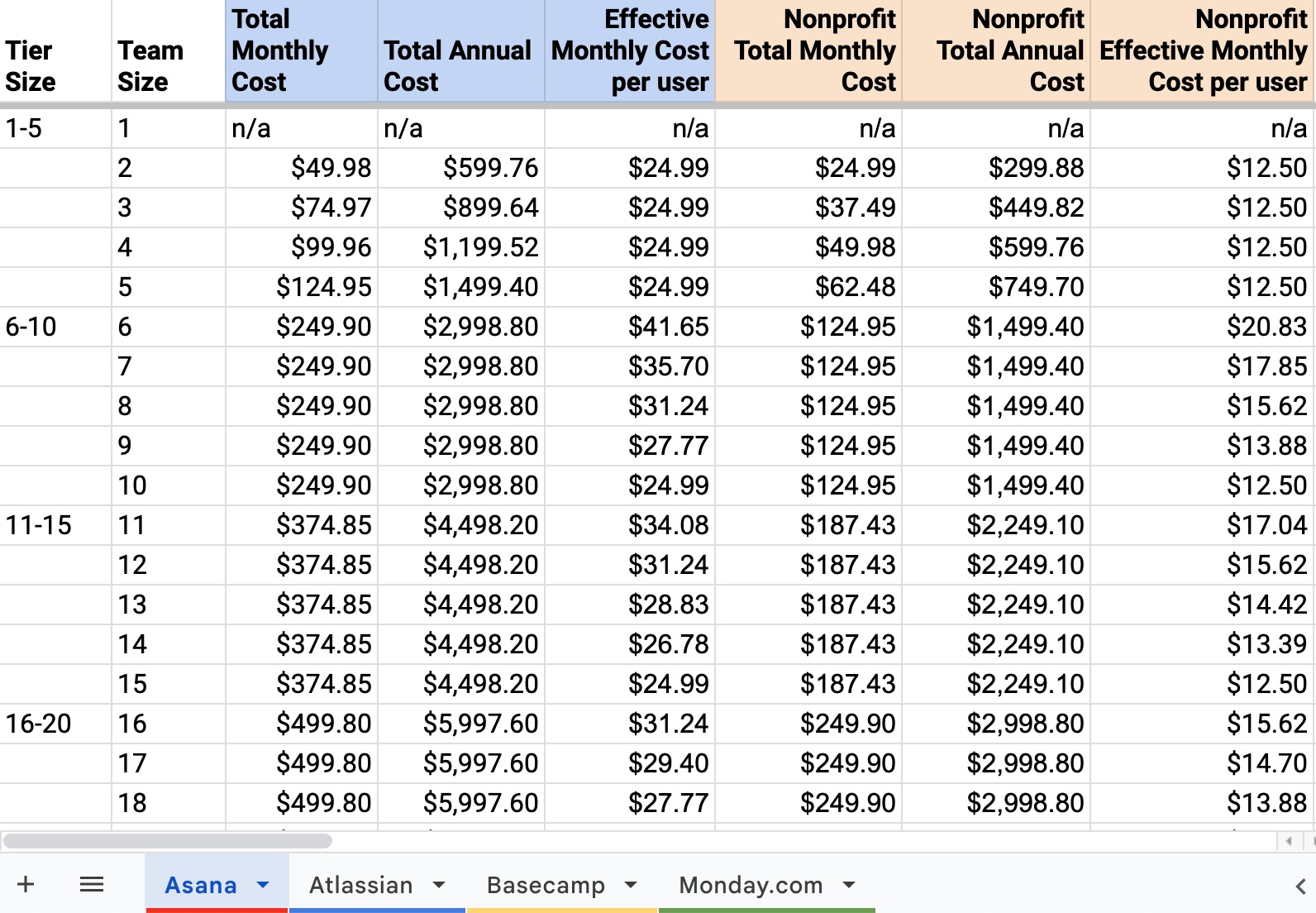
Enterprise pricing is beyond the scope of my analysis because this information can only be obtained by contacting vendor sales teams.
Here’s what I learned (examples show regular pricing without the nonprofit discount).
Tiered Pricing is Common
Asana and Monday.com offer tiered pricing, meaning that you must purchase licenses in blocks rather than by individual user. (Note: Atlassian offers tiered pricing but also offers per-user pricing which mitigates this concern.)
Let’s explore how this can be confusing, using Asana as an example. [I’m not trying to pick on Asana – other vendors use a similar approach. (Disclosure: I’m an Asana Ambassador.)]
Asana shows this pricing information on it’s website for the Advanced plan:
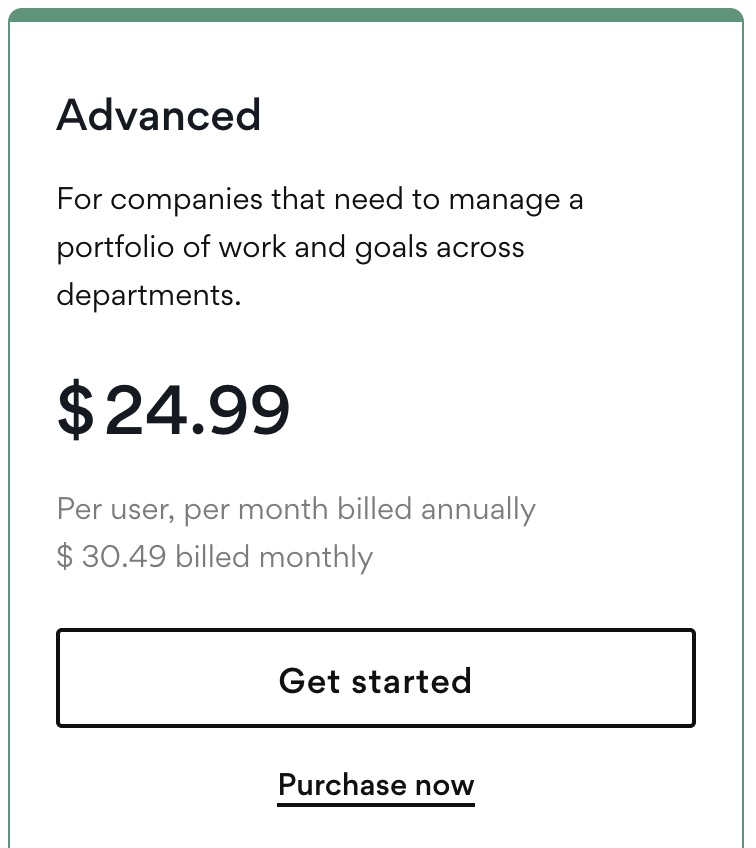
If you have a team of 21 users, this information would lead you to expect to pay $524.79 per month [21 users * $24.99/user = $524.79].
But Asana uses tiered pricing, which requires you to purchase the 25 user tier to accommodate 21 users on your team. That leads to a monthly price of $624.75 [25 users * $24.99/user = $624.75]. Almost $100 more per month or $1200 more per year than what you’d calculate based on the advertised price.
It’s true that at 25 users you’ll pay $24.99/user per month. But if you have between 21 and 24 users, you’ll pay an effective rate of between $29.75 and $26.03 per user per month.
The effect of tiering is magnified as you increase the number of users.
For example, if you had 101 users, you’d have to purchase the 125-user tier. You’d have a $30.93 effective monthly cost per user and pay almost $600 extra per month/$7200 extra per year than expected based on the advertised price.
Asana does offer a Frequently Asked Question section lower down on the pricing page which includes these two explanations about pricing:
How does Asana’s pricing work?
The Personal version of Asana is available for teams of up to 10 people. Asana Starter costs $10.99 per user per month when billed annually and $13.49 per user per month when billed monthly. The price of Asana Advanced is $24.99 per user per month when billed annually and $30.49 when billed monthly. We do not offer Asana subscriptions for 1-user plans. We do offer tiered plans for smaller teams, from 2-user to 5-user plans.
We need to change the number of people in our team. How will that work?
You’ll be able to add or remove teammates at any time, even before changing your subscription. Once you have updated the people in your team, we ask that you correct your subscription to match your current usage (we’ll remind you if you are over your seat limit). Our subscription offerings increase in increments of 5 users when total users are less than or equal to 30; increments of 10 when total users are between 30 and 100; increments of 25 when total users are between 100 and 500; and increments of 50 when total users are more than 500. When updating monthly subscriptions, all modifications will be implemented at the next billing cycle. For annual subscriptions, changes made within 30 days of purchase will take effect immediately, and a prorated charge or credit will be applied to your Asana account.
The first answer is downright misleading.
The second answer explains the tiered approach, but requires the purchaser to calculate the true costs.
It’s any company’s prerogative to set their pricing model. Being transparent about it (such as offering a pricing calculator or a pricing table) would be a customer-centric move to make it easier for organizations to understand their costs and to budget effectively for staff size increases. I might gripe about the approach, but at least there wouldn’t be any surprises.
Articles on 3rd party review websites are a waste of time
In compiling the data I searched for pricing information across the web. I read through dozens of articles on 3rd party sites.
Every article simply regurgitated the information in the vendor pricing charts. Not a single one mentioned tiered pricing or add-on costs for features highlighted in the articles. They sometimes highlighted product features without explaining which plan levels were required to use the features.
Bottom line: don’t waste your time on these articles. You’re better off digging through the vendor’s own website to uncover pricing information.
Vendors withhold a lot of information
It’s aggressively anti-customer to not provide information in an easily accessible way on your company’s website– requiring the customer to contact you for information.
- I didn’t include ClickUp in my evaluation because the website did not list a nonprofit discount percentage (I work with nonprofits). The website indicated that a discount is available, but you must contact them to get the details.
- Smartsheet didn’t make the list because it didn’t offer any insights into the cost of “premium” features such as portfolios or granular access permissions. You have to contact them for more information (and then figure out whether the Silver, Gold or Platinum level is right for you).
- I learned that Wrike has tiered pricing, but couldn’t find any information on it outside of a few nuggets in outdated user forum threads. It was therefore impossible to compile useful data.
- Even Monday.com, which had a handy team size estimator at the top of its pricing chart, makes you “Contact Sales” for a team size above 40 users.
Why the secrecy? I’d find out this information eventually. Why have me contact a person, who then has to spend time engaging with me, and then have me reject you, rather than providing the information on the website so you don’t incur additional sales rep costs? I don’t get it.
It doesn’t have to be this way
To anyone who might argue that this is how work management software pricing works, I call BS.
We only have to look as far as Basecamp and Atlassian to see examples of transparent pricing.
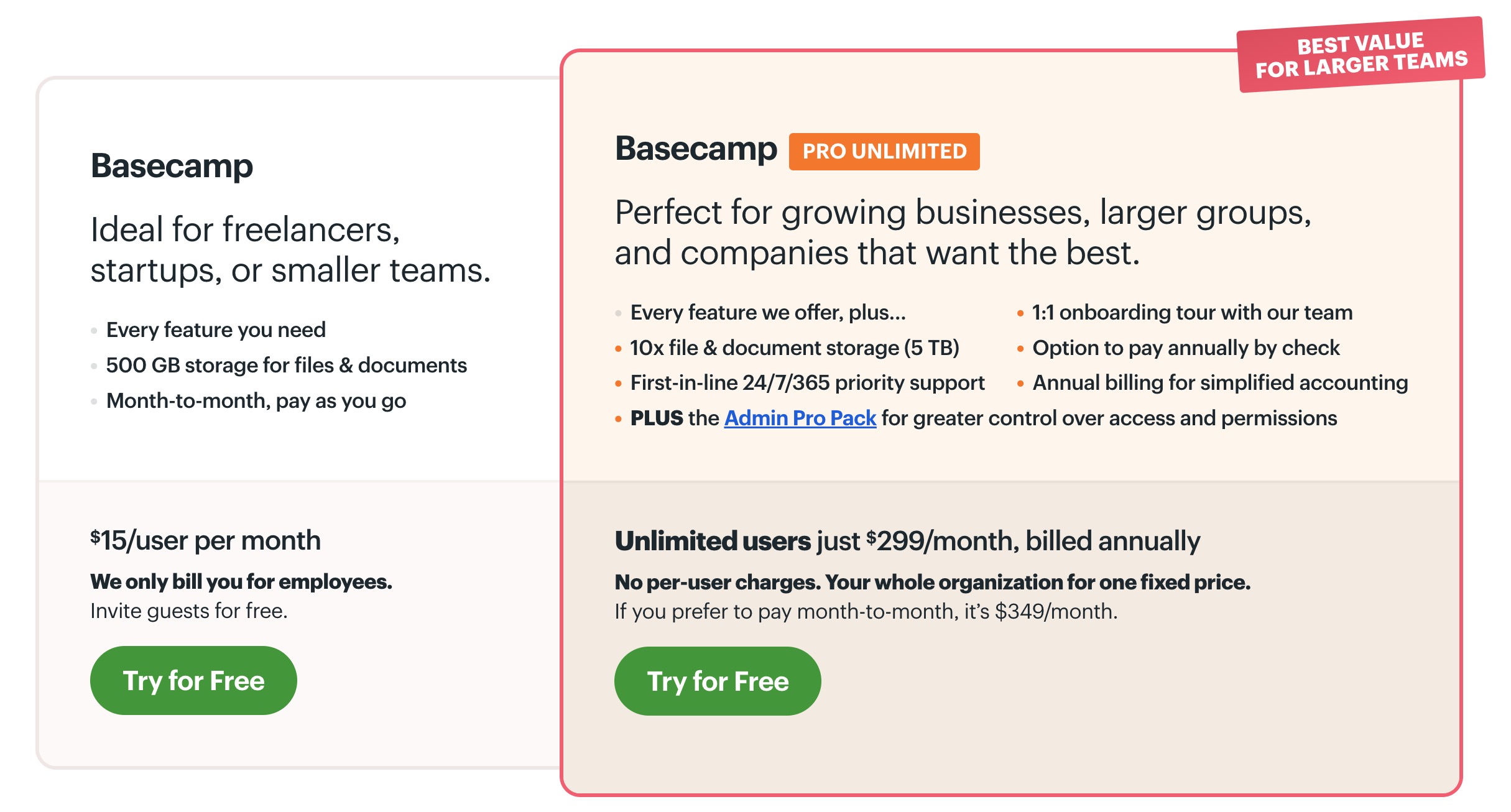
The Basecamp pricing page is straightforward:
- $15 per month per user
- $399/month for an unlimited user plan
- a prominent link to a discounts page, showing a 10% nonprofit discount
But wait, you say, Basecamp doesn’t try to serve the enterprise market, which is much more complicated. All these other tools are targeting enterprises.
OK, let’s look at Atlassian, which is undoubtedly a vendor that serves the enterprise market (and which, at 10,000+ employees, is an enterprise itself). On the Jira Work Management product pricing page, we see
- $10/user per month for the Premium plan
- A calculator at the top of the pricing chart that lets you input a number of users and select monthly or yearly billing to calculate an exact cost.
- Advertised cost/user equals actual cost/user for monthly pricing (no tier option)
- Annual pricing is tiered, and shows the total annual cost, accompanied by an identification of the tier level and the number of “filled” and “available” seats based on the number of users you input.
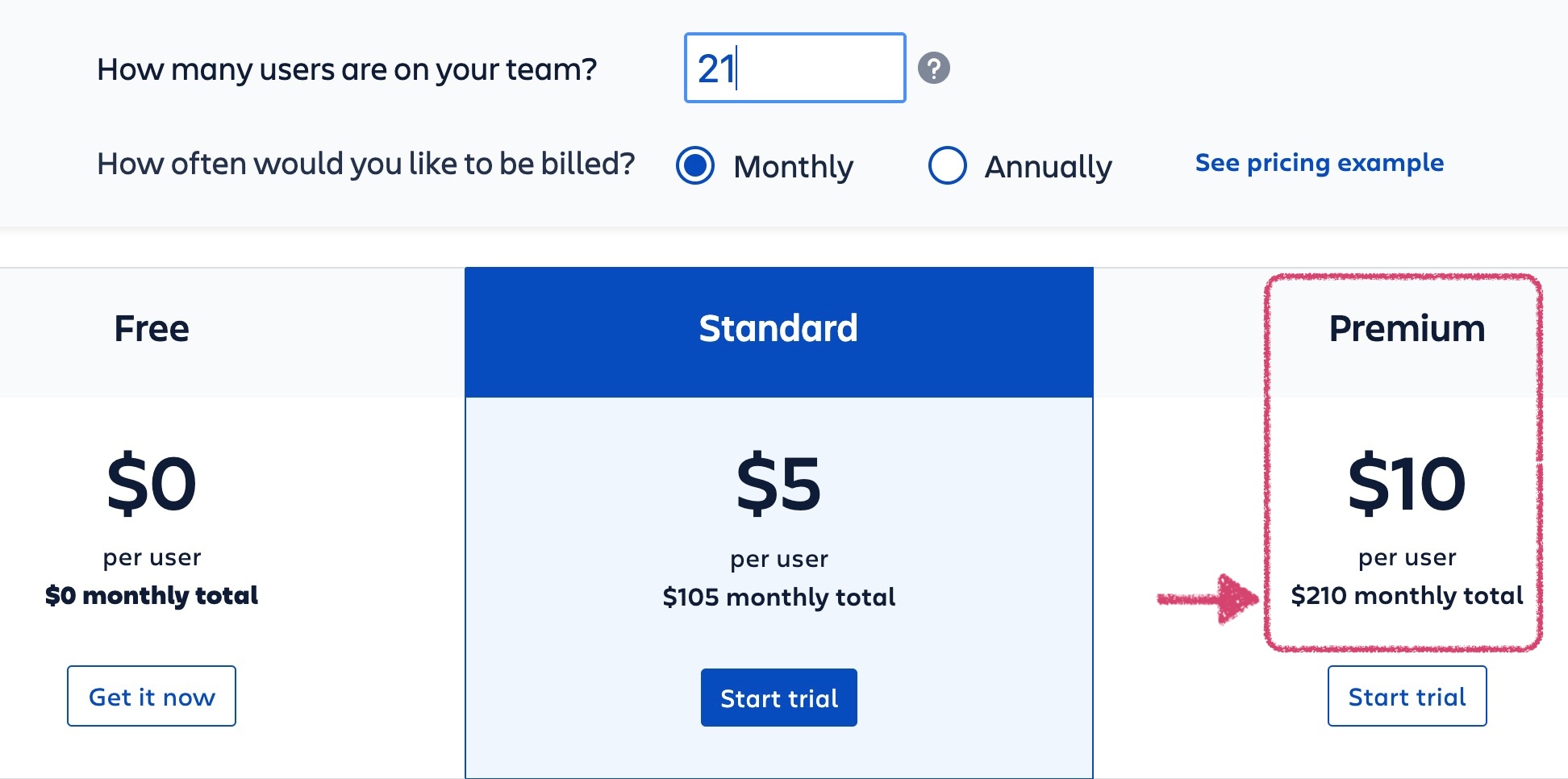
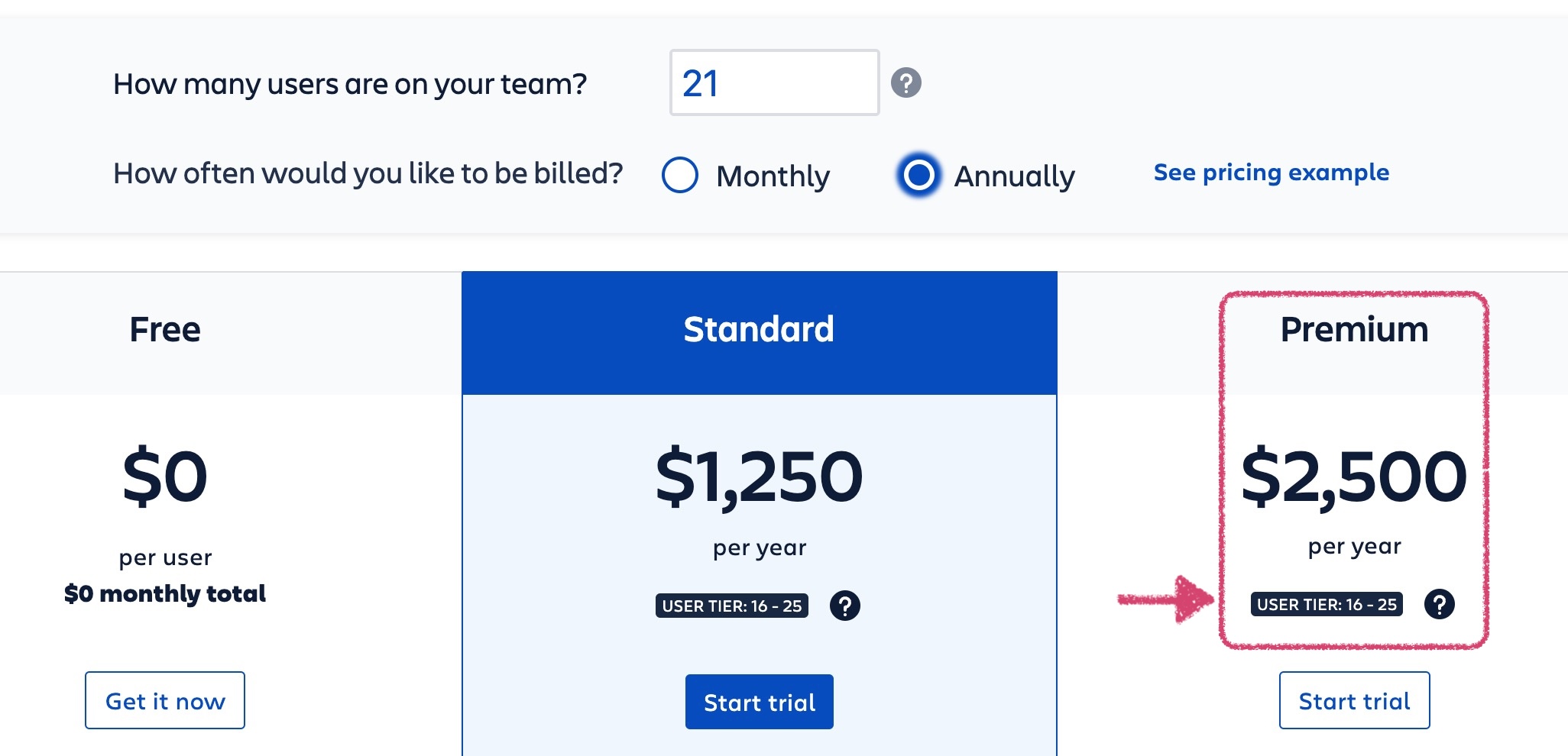
Atlassian actually reduces per user pricing above certain levels (e.g., $8/user/month for users 100-250), which is reflected in the calculator but not fully explained. And I had to dig to see that Atlassian offers a 75% discount to qualified nonprofits. But overall, Atlassian offers very transparent pricing, helping me understand the exact cost of licenses even if I use a tiered plan.
Transparency is possible.
You should use a work management tool
Yes, figuring out pricing can be a pain. And comparing features of competing products makes differential calculus seem easy. But at almost any cost, using the right work management tool can have an incredible positive impact on efficiency and enable you to do things you might let slide because they’re too time consuming. Even at an effective price of $41/month/user (the highest amount calculated in the pricing charts), and even with implementation and other costs, the efficiency gains will far exceed your outlay if you save even a few hours per week per person.
Vendor Links
- Asana
- Pricing + plan comparison
- Nonprofit pricing for qualified organizations
- Pricing explanation (scroll down to FAQs on pricing page)
- Atlassian Jira Work Management
- Pricing + plan comparison
- Nonprofit pricing for qualified organizations
- Pricing explanation (scroll down to Pricing structure on pricing page)
- Basecamp
- Pricing + plan comparison
- Nonprofit pricing for qualified organizations
- Pricing explanation (none needed– it’s all on the pricing page)
- Monday.com
- Pricing + plan comparison
- Nonprofit pricing for qualified organizations
- Pricing explanation (scroll down to How to pick your paid plan)
 Futurefactory